
Email deliverability issues? Get support from our community and run deliverability check.
What the 550 Email Error Really Means
Getting a 550 bounce is frustrating. It means your email was outright refused by the receiving server, this isn’t a temporary issue. Until the underlying cause is fixed, your messages won't go through. The 550 code alone isn’t very informative; the explanation that follows provides the real clue.
Common 550 bounce messages include:
550 5.1.1 User unknown
550 5.7.1 Message not accepted due to policies
550 5.7.26 Unauthenticated email from example.com is not accepted
Below, learn what each of these scenarios means and follow step-by-step solutions to resolve them quickly and safely.
First Step: Read the Exact 550 Text
Open the bounce-back email and copy the entire SMTP error response, usually found near the bottom. The message will show the code and the detailed reason, this is the information needed to guide your fix.
- 5.1.x codes suggest an issue with the recipient’s address.
- 5.7.x codes point to policy, sender reputation, or authentication problems.
- You may also see reference to SPF, DKIM, DMARC, or inclusion on blocklists.
Note these explanations closely. For each scenario, you’ll find instructions below to address the most common causes of 550 errors.
Quick Fixes for Common 550 Scenarios
550 5.1.1, User Unknown
- Double-check the recipient’s address for typos; confirm with the intended contact if possible.
- If the address is no longer valid, remove it from your lists.
- Stop resending to addresses that consistently hard bounce; repeated attempts can harm your sender reputation.
550 5.7.1, Rejected by Policy
- Review your domain’s SPF and DKIM records. Both should correctly authenticate every message you send.
- Make sure your “From” domain matches the domain that passes authentication.
- Implement DMARC for your domain, starting with
p=nonewhile you check alignment and delivery.
550 5.7.26, Unauthenticated Mail
- Sign every outgoing message using DKIM for your domain.
- Send mail via servers and IPs explicitly listed in your SPF record.
- Align your visible “From” domain with your authenticated sending domain to avoid DMARC failures.
550 Mentioning Blocklists or Reputation
- Check if your sending IP or domain appears on common blocklists.
- Resolve any security or spam issues responsible for the listing, then request delisting.
- Before you resume sending at your normal volume, warm up your domain and IP. This process means gradually increasing your sending volume to build and reestablish your sending reputation.
Authentication Checklist That Actually Resolves 550 Issues
Strong authentication resolves many 5.7.x errors. Here’s a reliable setup to follow:
- Publish an SPF record for your “From” domain, listing only mail servers you own or control.
- With DKIM (DomainKeys Identified Mail), sign your emails using a selector you control and rotate these keys at least yearly. Rotating keys helps maintain secure email practices.
- Add DMARC with reporting enabled. Start with
p=noneto monitor, then shift toquarantinefor more enforcement.
For a quick refresher, see this plain English guide to SPF, DKIM, and DMARC.
Common SPF Pitfalls
- Stay under the 10 DNS lookup limit. “Flatten” your SPF record if needed.
- Avoid
+all; use-allwhen you’re sure your record is correct. - If your bounce address differs from your From domain, make sure it’s also covered in SPF.
DKIM Alignment Tips
- Sign with the same organizational domain as your visible “From” address.
- Use 2048-bit keys where your provider supports it.
- Accurately publish the
p=value in your DNS. Watch for spaces or errors.
Reputation Recovery and Safe Ramp-Up
Many 550 responses indicate a lack of trust in the sender or the sending server. Trust must be rebuilt through consistent, positive behavior over time. It’s beneficial to increase email volume gradually on a daily basis, maintaining steady and predictable patterns.
This is where a tool like Mailwarm can be beneficial. Mailwarm is a software that helps manage your email reputation by simulating safe, positive mailbox activity. It uses a network of over 1,000 real, actively monitored mailboxes to boost your open, reply, and inbox rates, signaling ISPs that your emails are wanted. This supports a healthier sender reputation without trial and error.
For best results, increase your sending volume slowly and keep activity steady, letting your reputation recover incrementally.
Infrastructure Checks That Prevent Silent Failures
- Ensure your rDNS (PTR record) matches the hostname you use to send mail.
- Configure a proper HELO/EHLO value that resolves forward and reverse in DNS.
- Secure your Mail Transfer Agent (MTA) with a valid TLS certificate.
- Set up working inboxes for postmaster and abuse at your sending domain.
- Monitor bounces using a dedicated return-path address.
Small infrastructure misconfigurations can trigger rejections from major providers. Addressing them early creates a safer, more reliable sending baseline.
Sending Behavior That Avoids New 550s
- Immediately stop sending to addresses that result in hard bounces.
- Send emails at consistent times and volumes; sudden surges raise red flags.
- Don‘t repeatedly resend the same message after a rejection.
- Avoid using URL shorteners, as they often trigger spam filters.
- Keep attachments small; oversized files can cause message blocks.
Following these habits helps your sender reputation recover and keeps your emails landing in inboxes instead of spam folders.
When to Contact a Postmaster Team
Sometimes, even after all best practices are covered, 550 errors persist. If the bounce message mentions a specific provider program, it’s time to contact their postmaster support. Include relevant message headers, bounced timestamps, and sending IPs. Describe any changes you’ve made and ask directly for review or mitigation. Keep communications brief and factual for best results.
Fix It Fast: A 24–72 Hour Action Plan
- Collect samples of recent 550 bounce messages. Take note of the exact error text each one displays.
- Check SPF, DKIM, and DMARC for accuracy and alignment with your “From” domain.
- Correct any DNS issues. Lower your DNS TTLs to speed up changes propagating.
- Check for blocklistings and file delist requests after making corrections.
- Verify your infrastructure: rDNS, HELO name, TLS, and MX records should all be stable.
- Begin a warm-up sequence, slowly increasing your daily send volume as reputation improves.
- Remove all addresses that hard bounce; pause any questionable list segments for now.
- Test with small, sample batches per provider and monitor the outcome.
- Document all changes and share a concise summary with relevant team members.
Most senders see initial signs of improvement within days. Full recovery can take longer, consistent practices and patience are key.
Red Flags That Prolong 550 Problems
- Launching new domains with high send volumes immediately.
- Frequently changing the sender identity or domain.
- Mixing transactional and promotional/outreach traffic on the same IP address.
- Sending from an IP you don’t own or cannot identify.
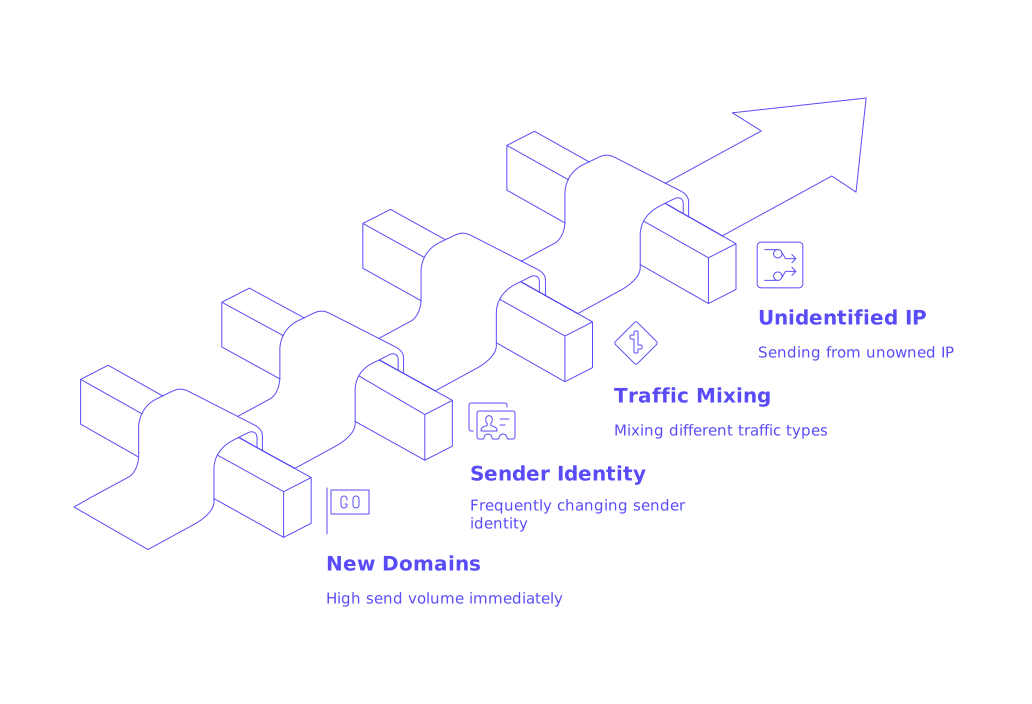
Address these problems before ramping up volume, or risk extended deliverability headaches.
Mailwarm in Your Recovery Toolkit
Domain and IP warm-up isn’t just a buzzword. Modern filtering systems watch sender activity closely and reward authentic, human-like engagement. Mailwarm simulates trustworthy mailbox interactions, real opens, replies, spam folder rescues, all on autopilot. This sustained, background activity supports a strong reputation, so you can focus on outreach while your signals stay healthy.
Wrap Up
A 550 error is noticeable, but also actionable. Read the returned message, pinpoint the cause, and apply the correct fix. Focus on authentication, domain alignment, steady sending, and maintaining an optimized infrastructure. Your emails will reliably reach real inboxes again.
If you want an expert review, don’t hesitate to connect with deliverability specialists at mailadept. Getting a second opinion can save days of troubleshooting.
FAQ
What does a 550 error indicate about my email's status?
A 550 error signals a hard block, your email was flat-out rejected. It underscores deeper issues like authentication gaps or compromised domain reputation, not something you can ignore or expect to resolve on its own.
Why is it essential to align SPF, DKIM, and DMARC records?
Misaligned SPF, DKIM, and DMARC records are red flags for receiving servers, often triggering rejection. Proper alignment forms the backbone of your email's authentic identity and credibility, essential for bypassing spam filters.
How can repeated hard bounces impact my sender reputation?
Repeatedly hitting the same dead-end inbox is a quick path to a damaged reputation. ISPs will see you as negligent and possibly malicious, accelerating your descent into spam folder and blocklist obscurity.
Is it wise to use URL shorteners and large attachments in emails?
URL shorteners and hefty attachments are spam triggers and can lead to immediate blocking. They clutter your email and invite scrutiny, endangering not just the current message but jeopardizing your overall sender trustworthiness.
What are the risks of sending high email volumes from new domains?
Launching massive email campaigns from fresh domains is like painting a target on your back. High-volume sends without history scream spammer to ISPs, prolonging efforts to establish a clean reputation.
Why is it important to warm up a domain gradually?
Ramping up volume too fast from a cold domain is reckless, similar to shouting from a new rooftop claiming legitimacy. Warm-ups cultivate trust gradually, preventing sudden blocking that would derange ongoing campaigns.
Is mixing transactional and promotional emails on the same IP advisable?
Combining transactional and promotional traffic is a risky blend that confuses sending identity. Transactional emails deserve an IP free from promotional baggage to protect their deliverability and avoid potential fallout from reputation issues.
When should you reach out to a postmaster team?
Persisting 550 errors, even after complying with best practices, signal it’s time to contact a postmaster team. Provide detailed error logs and recent changes, only they can unblock systemic issues.
How crucial is infrastructure in preventing silent failures?
Underestimated, infrastructure issues are silent killers of email deliverability. Clean rDNS, accurate HELO/EHLO, and validated TLS certificates are non-negotiable components to safeguard against unnoticed rejections.